
Door Configurator Software: 3D Design, Live Pricing, BOM and Quotes
A buyer-focused guide to door configurator software: the product rules, pricing, visuals, quote outputs and production data required to sell custom doors accurately.
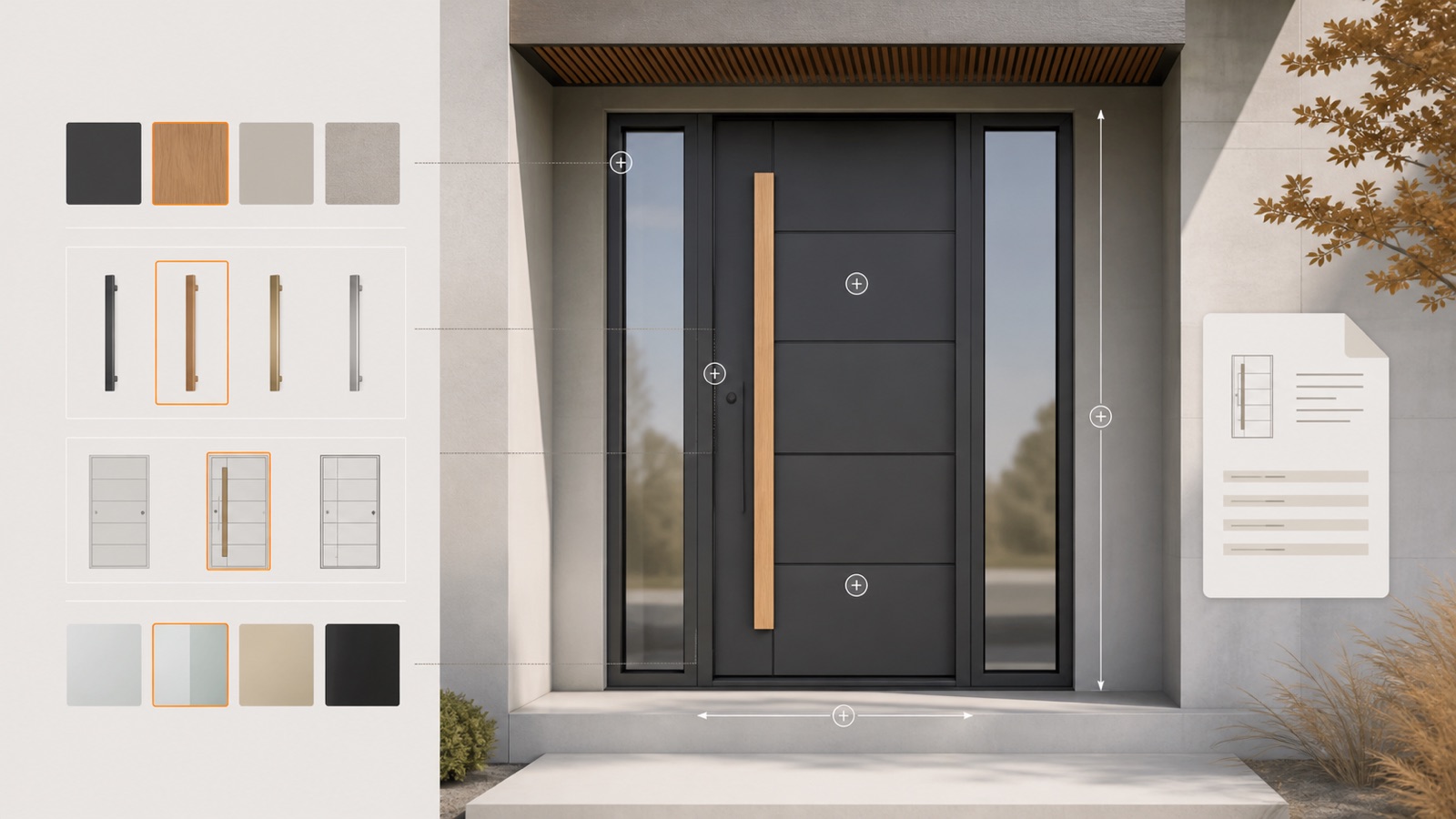
Table of contents
- What door configurator software should do
- Product rules that matter for doors
- Dimensions and construction
- Opening direction and handing
- Panels, glazing and sidelights
- Hardware and security
- Finishes
- Live pricing without spreadsheet re-entry
- From a door design to a bill of materials
- Website, showroom and dealer use
- How to evaluate a door configurator
- Configurix door configurator software
- Frequently asked questions
- Can customers use the door configurator on our website?
- Can the price stay hidden from public visitors?
- Can we change door options after launch?
- Can the software support several languages?
A door configurator is software that lets customers, dealers or salespeople build a valid door from the options you actually sell. A complete system shows the design in 3D, applies compatibility rules, calculates the current price and turns the selection into a quote or order record.
That is different from a gallery that swaps door images. Custom entrance doors, patio doors and door systems combine dimensions, panels, glazing, hardware, security, opening direction, finishes and installation choices. The configurator must understand how those decisions work together.
What door configurator software should do
The most useful door configurators support the complete sales decision:
- choose a door family and installation type;
- enter allowed width and height;
- select panel design, frame and finish;
- add sidelights, fanlights or glazing;
- choose handle, hinges, threshold, lock and accessories;
- validate combinations and dimensional limits;
- calculate a live price or dealer price;
- save the project and create a branded quote;
- pass the accepted specification into ordering or production.
If a system stops after step five, your team may still need to check the design and rebuild it elsewhere. That delays the quote and creates an opportunity for transcription errors.
Product rules that matter for doors
Door configuration is a constraint problem. The visual model should follow the same rules used by your technical and commercial teams.
Dimensions and construction
Width and height can affect panel construction, reinforcement, hinges, price bands and which models remain available. The configurator should enforce valid ranges and react when a size crosses a product threshold.
Opening direction and handing
Inside or outside opening, left or right handing, active leaf and traffic direction must be unambiguous. The quote and downstream data should carry the selected orientation in a form the customer and production team can both understand.
Panels, glazing and sidelights
Not every panel accepts every glass shape, sidelight or frame combination. A rule-based system can hide invalid choices and show only compatible options at each step.
Hardware and security
Handles, cylinders, electronic access, multipoint locks, hinges and closers may depend on door type, weight, market or security level. Configuration rules keep required components together.
Finishes
Frame, panel and accessory colours may be linked or independently selectable. A useful 3D preview lets the buyer compare materials while the exact finish codes remain attached to the specification.
Live pricing without spreadsheet re-entry
Door pricing may depend on model, dimensions, panel, glass, colour group, hardware, security package, installation and region. Some businesses use price matrices; others use formulas and option surcharges.
A door CPQ system should calculate from one controlled rule set and explain the result. Sales teams need to know which selections created the total. Administrators need a safe way to update prices without asking a developer to rebuild the interface.
Useful pricing controls include:
- retail, dealer and customer-specific price lists;
- dimension bands and oversize surcharges;
- option and package pricing;
- installation, delivery and survey zones;
- discounts with approval limits;
- taxes, currencies and market-specific rules.
Configurix connects these rules to the visible design. When the customer changes the door, the project price and quote update from the same configuration.
From a door design to a bill of materials
A bill of materials is valuable when the configuration contains reliable product identifiers and quantities. Depending on your process, the output may include frame profiles, panel, glass, hardware, seals, threshold, fixings and packaged accessories.
The BOM should be treated as a governed output. Agree on naming, units, rounding and acceptance examples. If the factory requires cut sizes, machining or CNC data, scope those outputs separately and verify them against the working production process.
Learn how Configurix approaches custom CPQ and automatic bill of materials.
Website, showroom and dealer use
One door configuration can serve several sales channels:
- Website: buyers explore styles, create a design and submit a structured enquiry.
- Showroom: staff compare finishes and hardware with the customer while pricing live.
- Dealer portal: authenticated partners use their own price level and branded documents.
- Sales consultation: a representative builds the final specification and sends the quote before the project loses momentum.
The public experience does not need to expose every technical field. A well-designed system can guide customers through a simpler journey while preserving the detailed data required by the sales team.
How to evaluate a door configurator
Ask each vendor to configure a difficult real example from your catalogue. Then check:
- Are the dimensions and combinations valid?
- Does handing remain clear in 3D, the quote and order data?
- Can the configurator handle sidelights, double doors and hardware dependencies?
- Does pricing match your approved calculation?
- Can your team update options and prices?
- Is the result fast on an ordinary phone and laptop?
- Can the project be reopened without losing the original selections?
- Are quotes, BOMs and integrations created from the same configuration?
- Can the experience use your brand, language, units and market terminology?
Do not accept a polished generic demo as proof. The acceptance test should use your product rules and your expected output.
Configurix door configurator software
The Configurix Door Configurator is built for door manufacturers, distributors, dealers, retailers and installers. It can combine white-label 3D configuration, made-to-measure dimensions, live prices, branded quotes, structured leads and downstream project data.
Your implementation can cover one focused product for a fast launch or several door families in a custom white-label build. Multiple languages, currencies and dealer rules can be planned into the same system.
Book a door configurator demo and bring a catalogue, price list or example quote. We will show how the product can be represented and what data is needed for launch.
Frequently asked questions
Can customers use the door configurator on our website?
Yes. The experience can be white-labelled and embedded into an existing website so the customer stays inside your brand.
Can the price stay hidden from public visitors?
Yes. You can show a price, a range, “request a quote”, or an internal/dealer-only price depending on your sales model.
Can we change door options after launch?
Yes. The maintainability of products, prices and option rules should be included in the implementation scope and administration model.
Can the software support several languages?
Yes. Configurix can present the configurator and generated documents in multiple languages, including market-specific product names and terminology.
Ready to try Configurix?
See how the configurator, quoting and CRM work together for your business.
Book a demo →Related articles
Calculer le ROI d’un configurateur 3D/AR pour revendeurs de pergolas : modèle chiffré
Guide pratique pour revendeurs et installateurs : comment un configurateur 3D/AR qui génère devis PDF brandés, signature numérique et planning partagé rembourse l'investissement — modèle ROI chiffré et scénario concret.
SEO local pour vendeurs outdoor : convertir avec un configurateur 3D/AR
Attirez et convertissez des clients locaux (pergolas, stores, vérandas) en combinant pages locales optimisées et un configurateur 3D/AR : guide pratique pour générer des leads qualifiés et devis signés.
Transformer visiteurs web en RDV qualifiés et devis signés avec un widget 3D/AR
Comment convertir les visiteurs de votre site en rendez‑vous qualifiés et devis signés : widget 3D/AR embarqué, capture de leads, devis PDF brandé, signature digitale et calendrier partagé — tout en une seule plateforme.